
When I first tried AvoMap animated travel maps, I was just looking for a fun way to show my road trip. I didn’t expect it to turn my journey into such an eye-catching video. It felt like a mini movie, following my path with smooth camera movements, custom icons, and real 3D maps. And guess what? I did it all without any editing skills!
Imagine turning your travel experiences and adventures into breathtaking animated maps that capture every twist and turn of your journey. With AvoMap, you can do just that and more.
Let me tell you what I learned from using AvoMap.

What Is AvoMap?
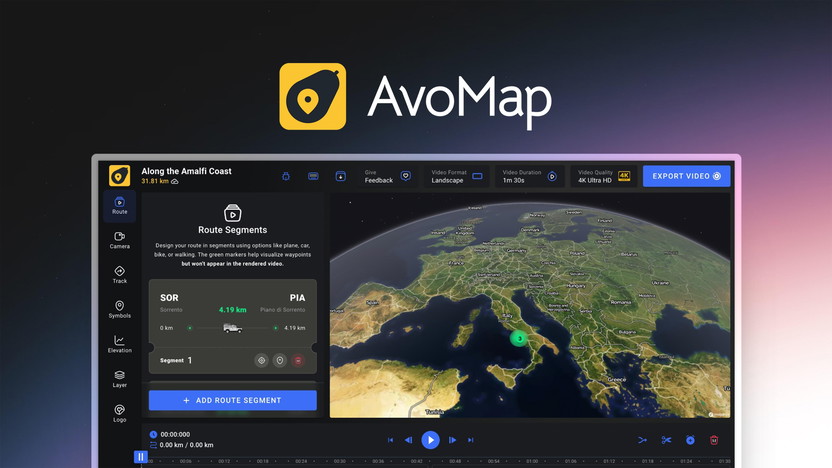
AvoMap is a tool that helps people like me turn travel routes into animated 3D videos. You upload your GPS data (like GPX or KML files), and the tool creates a video showing your journey. It adds cool effects, follows your path, and even shows hills and elevation changes.
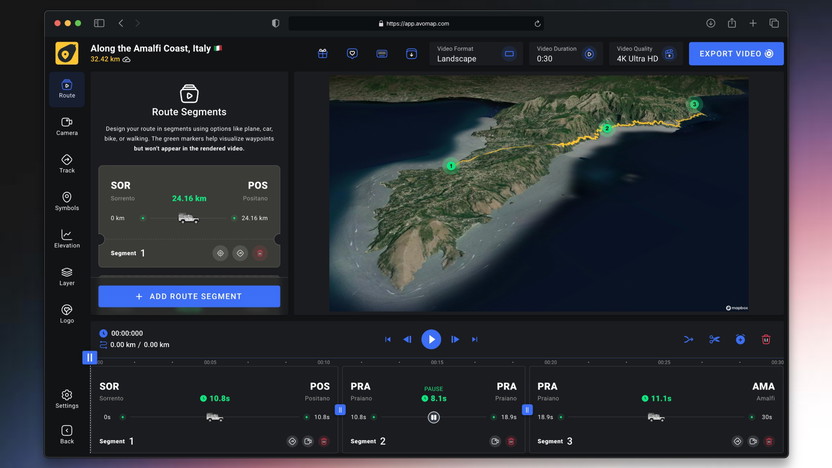
I liked how I could mix flights, road trips, hikes—everything into one clean video. It made my story easy to follow and fun to watch.
Features of AvoMap Made Special for me
🗺️ 3D Route Animation
Show your travel path with smooth, animated 3D maps. Perfect for road trips, flights, hikes, or biking adventures.
🎥 Dynamic Camera Angles
The camera moves with your journey. You can adjust it to follow the route in a fun, cinematic style.
📍 Add Markers & Points of Interest
Highlight special places on your map with icons and custom notes.
🔄 Combine Multiple Routes
Mix road, flight, and walking paths into one single video.
🔧 Custom Branding
Add your logo or symbols to make the video truly yours.
📁 GPS File Support (GPX, KML)
Upload GPS data from your phone or watch to show the exact route you traveled.
📊 Elevation Charts
Show hills and valleys in your journey using animated elevation visuals.
🖼️ Custom Intros & Outros
Personalize your video for social media with custom starting and ending screens.
📲 Easy Sharing Options
Export your video in different sizes and formats for Instagram, YouTube, Facebook, and more.
🆓 No Subscription Required
Create videos for free. Pay only when you want to save and download.
👶 Beginner-Friendly Interface
No editing skills needed. Just upload, set your options, and render.
Pricing And Plan
There is a Question: Is Avomap Free? The Answer is Yes—and no. You can try it for free. You can design as many videos as you want. But to download and share a video, you need render credits. That’s how AvoMap charges you. No monthly fees. Just pay when you want to save a video.
I liked that. No hidden fees, no commitments. I paid only when I loved what I made.
🆓 Free Plan
- Try all features
- No cost until you render
- Can’t download videos
💰 Paid Plan
It’s fair and simple. I started with the free version, and once I loved a video, I paid to download it.
| Feature | BasicFor Video Credits | Plus ⭐Save 20% | Pro 🔥Save 47% |
|---|---|---|---|
| Export in Full HD or 4K Quality | ✅ | ✅ | ✅ |
| 60 Frames Per Second | ✅ | ✅ | ✅ |
| White Labeling | ✅ | ✅ | ✅ |
| Design Your Own Routes | ✅ | ✅ | ✅ |
| Unlimited Map Markers | ✅ | ✅ | ✅ |
| Custom Map Markers | ✅ | ✅ | ✅ |
| 10 Different Map Styles | ✅ | ✅ | ✅ |
| Full Animation Control | ✅ | ✅ | ✅ |
| Elevation Profile | ✅ | ✅ | ✅ |
| Custom Colors | ✅ | ✅ | ✅ |
| Import GPX or KML Files | ✅ | ✅ | ✅ |
| Custom Route Avatar | ✅ | ✅ | ✅ |
💡 Basic is great for trying things out with no commitment.
🌟 Plus is the most popular—ideal for regular users.
🔥 Pro gives the most features for the best price per video.
Pros And Cons Of Using Avomap
✅ Pros
- Easy to use – No video editing skills needed. Just upload and create.
- 3D animated maps – Makes your trips look like a movie.
- Custom branding – Add your own logo and personal touch.
- Supports GPX/KML files – Upload real travel data from GPS apps or devices.
- Works with all travel types – Combine flights, car trips, hikes, and more.
- Dynamic camera views – Follow your route with cool angles.
- Elevation charts – Show the ups and downs of your journey.
- Custom markers – Highlight special places with icons and notes.
- Pay-as-you-go – No monthly subscription. Pay only when you download.
- Social media ready – Export in formats for YouTube, Instagram, etc.
⚠️ Cons of AvoMap
- No refunds – Once you pay to render a video, there’s no money-back option.
- Credit system – You need to buy credits to download videos.
- Free version has limits – You can create videos but not save or export them.
- Cost may add up – Frequent users might find the credit system a bit expensive over time.
- No offline use – You need internet access to use the tool.
Who Should Use AvoMap?
Here’s who I think will enjoy it most:
✈️ Travelers Like Me
I used it for my trips across Europe. It felt like reliving the journey again. The animation made it more emotional and personal.
📸 Content Creators & Bloggers
If you post about travel, AvoMap helps your posts stand out. You can combine different routes and show them as one cool video.
🧑🏫 Teachers
Yes! I saw how a teacher used it to explain historical routes and geography. With AvoMap, even complex lessons look exciting.
Frequently Asked Questions
What is AvoMap?
AvoMap is a simple tool that turns your trip data into animated videos using 3D maps and dynamic camera moves.
Is AvoMap beginner-friendly?
Yes! I didn’t need any video editing skills. Just upload, click, and render.
Can I use AvoMap for school or work?
Definitely. Teachers can use it for lessons, and businesses can use it to show delivery routes or events.
Does it work on mobile?
Yes, but I found it easier to use on a laptop for better control.
Final Thoughts
AvoMap animated travel maps made my journey unforgettable. I didn’t need fancy tools or editing knowledge. It was fun, fast, and super visual.
Whether you’re a traveler, teacher, or blogger, AvoMap can bring your route to life in a way plain photos can’t.
Try it free. Upload your path. Watch your journey come alive.
👉 Your adventure deserves more than a static map. Let AvoMap turn it into a story.