
We all deal with PDFs, whether it’s for school, work, or just organizing personal stuff. I’ve always been on the hunt for a tool that makes this easy, without breaking the bank. So, when I came across the UPDF Lifetime Deal, I had to try it.
The promise was simple: a powerful PDF editor with a one-time payment. No more monthly bills! So, I downloaded it on my laptop and my phone to see if it could really handle everything I needed.
What is Updf PDF Editor
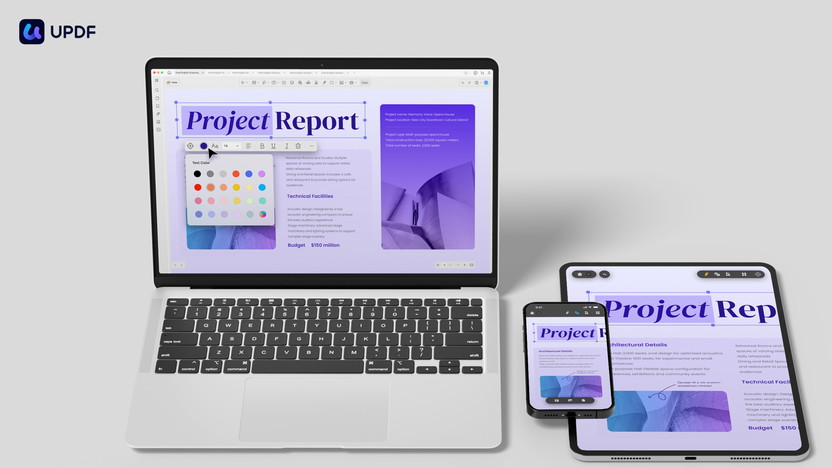
UPDF is a cross-platform PDF editor that works on Windows, macOS, iOS, and Android. Whether you’re a student, a freelancer, or a business owner, this tool has everything you need to manage PDFs efficiently.
What makes it stand out is its all-in-one approach. It lets me do things like:
- Edit Everything:
I could change text, images, and links in a PDF just as easily as I would in a Word document. - Convert Files:
I often need to turn a PDF into a Word or Excel file. UPDF did this perfectly, and the formatting didn’t get messed up, which is a common problem with other tools. - Use OCR Technology:
This was a game-changer. I had a scanned document that I needed to edit. UPDF’s OCR feature recognized the text, making it fully editable. - Keep Things Safe:
It has great security features. I could add a password to protect a file or even black out sensitive info with the redaction tool. - Annotate and Organize:
I could highlight important parts of a document or reorder pages with just a few clicks.

Unique Features Of Updf
UPDF is an all-in-one PDF editor with a wide range of features designed to make working with PDFs as simple as possible. It’s known for being a powerful and user-friendly alternative to more expensive PDF software.
Core PDF Editing & Management Features
UPDF provides all the fundamental tools you need to handle PDF documents effectively.
- Edit PDFs:
You can modify existing text, images, and links directly within the PDF file, just like in a word processor. You can also change the font, size, and color of the text. - Annotate PDFs:
This is great for collaboration and review. You can add highlights, underlines, sticky notes, text boxes, and even draw freehand with a pencil tool. It also includes stamps and stickers for visual feedback. - Convert PDFs:
UPDF allows you to convert PDFs to and from a variety of formats, including Microsoft Word, Excel, PowerPoint, images (like PNG, JPG), HTML, and more. - Organize Pages:
You can easily manage your documents by rotating, reordering, deleting, inserting, or extracting pages. It also supports merging multiple PDFs into a single file and splitting one PDF into several. - Fill & Sign Forms:
UPDF lets you create, fill out, and sign interactive PDF forms. You can add both typed and handwritten signatures. - Secure Documents:
For sensitive information, you can protect your PDFs with passwords to restrict viewing or editing. A redaction tool is also available to permanently black out text or images.
Advanced & AI-Powered Features
Beyond the basics, UPDF integrates advanced technology to enhance your productivity.
- OCR (Optical Character Recognition):
This feature is a lifesaver for scanned documents. It can recognize text from image-based or scanned PDFs and turn them into editable and searchable files. UPDF’s OCR supports over 38 languages. - UPDF AI:
This is a powerful, integrated AI assistant. With UPDF AI, you can:- Summarize PDFs: Get quick summaries of long documents.
- Translate Content: Translate sections of your PDF into different languages.
- Explain Complex Terms: Ask the AI to explain specific concepts or jargon in the document.
- Chat with your PDF: Have a conversation with your document to find specific information or ask questions.
- UPDF Cloud:
The software comes with cloud storage that syncs your files across all your devices, allowing for seamless access and collaboration.
Usability and Cross-Platform Compatibility Features
One of UPDF’s biggest selling points is its user experience and accessibility.
- User-Friendly Interface:
The design is clean and intuitive, making it easy for beginners and experts alike to navigate. - Cross-Platform Support:
A single UPDF license can be used on Windows, macOS, iOS, and Android. This allows you to work from any device without having to purchase multiple licenses.
Pricing And Affordability Of Updf Lifetime Deal
The UPDF Lifetime Deal offers a cost-effective solution for individuals seeking comprehensive PDF editing capabilities. With a one-time payment option, users can enjoy lifetime access to advanced features without the burden of recurring fees. This makes UPDF an attractive choice for budget-conscious users.
Lifetime Deal Overview: One-time Payment Benefits
The Lifetime Deal for UPDF is priced at $59, discounted from the original $109.99. This single payment grants unlimited access to UPDF’s robust suite of PDF tools. Users can edit, annotate, convert, and protect PDF files across multiple devices and platforms, including Windows, macOS, iOS, and Android.
- Lifetime Access: No need to worry about monthly or yearly subscriptions.
- Comprehensive Features: From editing to organizing, all tools are included.
- Cross-Platform Compatibility: Use on up to four devices.
In addition to the lifetime access, users receive 2GB of UPDF Cloud storage. This deal does not include the AI Assistant, which requires a separate purchase.
Cost Comparison With Other Pdf Editors
When comparing UPDF to other PDF editors like Adobe Acrobat Pro or DocuSign, the cost benefits become clear. These popular alternatives often require ongoing subscription fees, which can add up over time.
| PDF Editor | Pricing Model | Cost |
|---|---|---|
| UPDF | One-Time Payment | $59 |
| Adobe Acrobat Pro | Subscription | $14.99/month |
| DocuSign | Subscription | $10/month |
The UPDF Lifetime Deal stands out for its affordability. With a one-time fee, users avoid the accumulated costs that subscriptions entail. The 60-day money-back guarantee also ensures satisfaction, providing peace of mind to potential buyers.
Pros And Cons Of UPDF
After using UPDF for a while, here’s my honest takeaway:
Pros:
- True Cross-Platform Access:
I really love that I can use it on up to four devices (two desktops, two mobiles) with a single account. - Affordable:
The one-time payment is a fantastic alternative to expensive subscriptions. - Easy to Use:
The interface is clean and simple. I didn’t have to spend a lot of time trying to figure out where everything was. - Powerful Features:
From editing text to using OCR, it has all the tools you need for serious PDF work.
Cons:
- AI Assistant Not Included:
You have to buy the AI features separately, which is a bit of a bummer. - Limited Cloud Storage:
2GB of storage might not be enough if you work with a lot of big documents.
Ideal Users And Scenarios For Updf
Students:
Easily annotate notes, highlight textbooks, and combine pages to create custom study guides.
Freelancers & Consultants:
Quickly sign contracts, protect sensitive client data with passwords, and keep all your business documents organized.
Small Business Owners:
Manage invoices and forms, securely share important files, and save time on paperwork.
Remote Workers:
Work seamlessly from anywhere, with all your documents synced and available across your computer, tablet, and phone.

Frequently Asked Questions
What is UPDF and why is it the best PDF editor?
UPDF is a cross-platform PDF editor for editing, converting, and more. It’s best for its lifetime deal, ease of use, and features without subscriptions.
Is UPDF a good alternative to Adobe Acrobat Pro?
Yes, UPDF is a great, affordable alternative. While Adobe Acrobat Pro requires a monthly subscription, UPDF offers similar powerful features for a single, one-time payment.
Can I use UPDF on my phone?
Yes! UPDF works on iOS and Android, so you can edit PDFs on the go.
Does the UPDF Lifetime Deal include the AI Assistant?
No, the UPDF Lifetime Deal provides lifetime access to the core editing features and cloud storage, but the AI Assistant is a separate purchase.
Conclusion
For anyone who works with PDFs often and is tired of paying a monthly fee, UPDF is a solid choice. It’s a powerful, user-friendly, and very affordable tool that gets the job done. While the AI features are a separate purchase, the core features of the lifetime deal are more than enough for most people. I can honestly say it’s one of the best PDF editors I’ve used, especially considering the price and the fact that you own it forever.